Introducing Corpus: checking the references of many papers in one run
CitationLab Team · November 2026 · 14 min read
One batch in, one press per stage, a Ref[In] Level 1 report out for every paper.
Corpus is the part of CitationLab built for checking the references of many papers
at once — a cohort’s theses, a term’s dissertations, a set of papers before an institutional
deadline. You add the whole batch, and each stage of the check runs across every paper with a
single press. At the end there is a Ref[In] Level 1 report for each paper, and one zip that holds
them all.
This guide explains what Corpus is, how a run moves through its five stages, what each stage
produces, what it costs and keeps, and how to read the results. It is the product guide; our
companion piece on how Corpus makes bulk
checking easier looks at it from a library’s or a graduate school’s side of the desk.
What Corpus is
A single check in CitationLab takes one document through the organising pipeline: extract the
citations and the reference list, review them, de-duplicate, cross-check one against the other,
and issue a Level 1 report. Corpus runs that same pipeline over many documents at once.
The important word is same. Corpus adds no engine of its own. Every paper in a corpus
becomes its own session, and every stage calls the app’s own extraction, review,
de-duplication and cross-check on that paper’s session — exactly as if you had uploaded it on
its own. What Corpus adds is the fan-out: one press reaches every paper, the work runs on
CitationLab’s servers rather than in your browser, and the review is quoted and paid for as one
bill. A paper checked in a corpus and a paper checked on its own use the same checking rules.
The actual findings still depend on the document, its extraction and the review; sharing an
engine is not a promise that separate AI-assisted runs will produce identical results.
Corpus is reached from the app — the Corpus entry in the app’s navigation opens it in its own
tab — or directly at /corpus. Any signed-in account can use it; there is no
separate plan or role. It uses the same account and the same credit balance as the rest of the
app.
Where it stops, and why
Corpus covers the organising stages and ends at the Level 1 report. It deliberately does not
offer a mass Find or a mass Update. Those branches change a document — they add references,
replace references and rewrite citations — and every one of those changes needs a person to
decide it. A batch tool that rewrote fifty theses on one press would be making fifty authors’
decisions for them. When a paper in a corpus needs that work, it goes through the main app,
where each change is proposed and approved individually.
Before you start
- Two papers or more. A corpus is a batch. A single paper belongs in the
main app, which does more with it — the full review surface, the Find and Update branches — and
Corpus will point you there.
- Whole documents. Upload each paper as it is, with its reference list.
Corpus accepts Word (.docx and .doc), ODT, PDF and plain text. As in the main app, Word reads
most reliably; PDFs should be text-based rather than scanned page images.
- Papers you did not write. In institutional use the papers are normally
other people’s work. For that content you are the controller and CitationLab is the processor:
you decide which documents are submitted and why, and you are responsible for the lawful basis
and any notice or approval your institution requires. Where an institution submits student or
staff work at scale, contact us first so the arrangement is covered by a written data-processing
agreement. Our Privacy Policy and Terms of Service set this out in full.
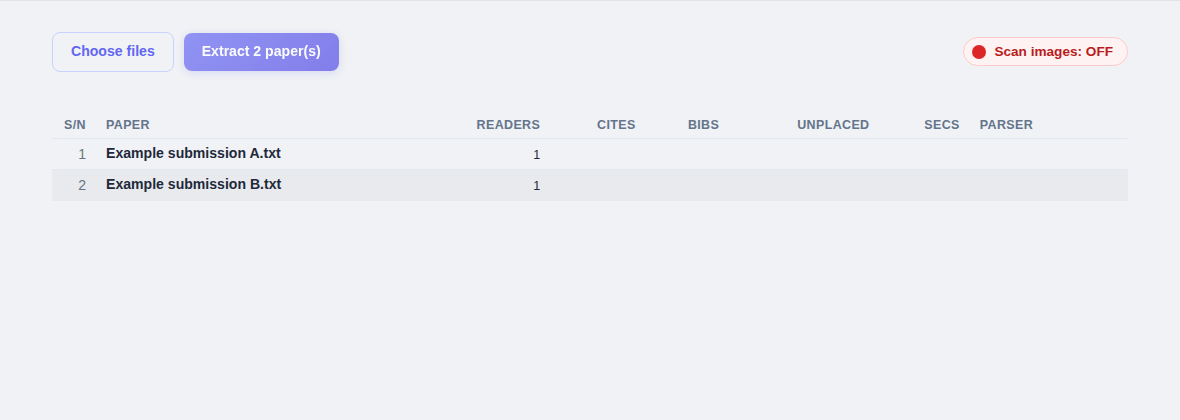 The Corpus upload interface with two clearly labelled example files selected, before extraction. Captured from the local application build; no private submission data or checking results are shown.
The five stages
Corpus has its own rail, in the same style as the app: Extract,
Review, De-duplicate, Cross-check and
Level 1 reports. A stage opens when the one before it has finished, because each
reads what the previous one produced. A stage behind the front stays visible and its lists still
open, but it accepts no new work — so a corpus always describes one consistent state of its
papers.
Stage 1 · Extract
Choose your files — as many as the batch holds, in one selection — and press Extract
N paper(s). Each paper is read through the app’s own extraction, and a row appears for
it with its counts: citations found in the text, entries parsed from the reference list, and items
set aside as not-a-citation. Every count opens to its list, so you can see what was read before
anything is paid for.
One option sits beside the button: Scan images, off by default. Turned on,
it lets you choose which formats — Word, PDF, ODT — have their images and scanned pages read for
citations too. It is off by default because reading images takes minutes of processing for a
picture-heavy paper, so it is your call per run; if the batch contains PDFs, the page reminds you
that citations inside scanned pages will not be read while it is off.
Extraction is free and repeatable. Until the review is paid for you can add papers, drop a
paper, or clear the batch and start again. An unpaid corpus is not added to Saved corpora: each paper is held as a working session for 24 hours from its latest activity, and the
page tells you plainly that closing the browser or logging out before the review ends the run.
Stage 2 · Review — the one paid step
The citation review is the stage that uses AI, and it is the only paid step in a corpus. The
charge comes before the review, by design: you see the price of the whole batch before the
expensive part starts, not afterwards.
The quote is the server’s, and it is built honestly: it adds up the app’s own estimate for each
paper, exactly as a single check would be priced. Papers that read nothing — an empty file, a
document with no citations — cost nothing, and the quote says how many there are. Beside it you see
your balance and, if the batch costs more than you hold, how much you are short, with a link to buy
credits. Before the review reads the work, the app asks for the same consent it asks for in a
single check.
Then one press — Run review on N paper(s) — reviews every eligible paper. A
paper that has already been reviewed is not charged again; the button runs only the papers still
needing review. While it works, a counter shows how many are done, and a Stop
button is there if you need it.
Paying for the review is also what saves the corpus. From that moment the run is kept on your
account for one year from the date of payment, under Saved corpora in the
sidebar, so it cannot be lost between stages. Extraction is sealed at the same moment: adding or
re-reading a paper after the review would describe a corpus the review never saw.
Stage 3 · De-duplicate
De-duplication runs the app’s own de-duplication over every paper’s citations and reference
list, so that one work cited two ways is counted once before the cross-check. Each paper shows how
many citations it had before and after, and the duplicates that were merged away remain visible,
with what each was absorbed into.
Where the engine finds pairs that may be the same work but cannot be sure, it asks. Those uncertain pairs wait for your decision before they are
merged. You can decide pair by pair, or settle the whole corpus at once with
Merge all duplicates or Keep all separate — a practical choice
when a batch produces dozens of near-identical suggestions. Duplicate entries inside a reference
list are reported for your attention; they do not block the run.
Stage 4 · Cross-check
The cross-check matches every in-text citation against its own paper’s reference list — the
deterministic audit the Level 1 report certifies. It is the same cascade as a single check: a shared
identifier first, then exact author and year, then the reference line as written. No AI decides a
match, and running it again gives the same answer.
Each paper gets its counts — matched, cited but missing from the
bibliography, and in the bibliography but never cited — and its
Ref[In] Score, the same number that paper’s Level 1 report will print. Every count
opens to its list, so a reviewer can go from a number straight to the citations behind it.
Stage 5 · Level 1 reports
Press Produce N report(s) and the Academic REFerence [IN]tegrity Report is
produced for every paper. Each has its own Download and Share:
the PDF, or a link you can send to a supervisor or an author. The buttons mint fresh download or share links when you
press them, including when you reopen a saved run later. A download ticket is short-lived;
reopening the run requests a fresh one rather than making an old ticket last indefinitely. Download all gives you one zip
holding every ready report — the form most institutions want for their records.
Reading the results
A corpus produces one report per paper, and each report is a full Level 1 report — the same
document a student would receive from a single check. Our guide to what
a Ref[In] report tells a supervisor walks through one in detail. Across a batch, three things
are worth knowing.
The scale is fixed. The Ref[In] Score sits on eight bands, from Excellent to
Critical, and the bands never move. Two papers in the same corpus, or the same paper checked again
next term, can be compared directly. The bands are tight at the top: Excellent means every citation
and every reference is accounted for, and the bands just below it are narrow.
Read the counts, not only the score. A paper with three missing references and
a paper with thirty can sit in neighbouring bands if their sizes differ. The counts on the
cross-check stage — and the lists behind them — say what the work actually is.
Exceptions are visible, not hidden. A paper whose reference list could not be
read, a paper with no citations, a paper that read nothing — each shows as such in its own row,
rather than quietly dropping out of the batch. The ones that need a person are the ones that are
easy to find.
What a Level 1 report does and does not certify
Level 1 certifies the organising stage: the document as submitted, after extraction, review,
de-duplication and the cross-check, before anything has been looked up, replaced or edited. That
makes it the right instrument for a batch — it describes every paper on the same terms, without
changing any of them.
It is precise about its limits. A citation marked missing has no corresponding entry in the
paper’s own reference list; whether the cited work can be found is a separate source-checking question.
Corpus does not perform that external search; the Find branch in the main app offers a separate
workflow for investigating missing references. An unknown year is not a missing
source. A questionable pair is a request for a person to look. And the score measures how well a
paper’s citations and references agree with each other: it is not a similarity score, not a grade
of the research, and not a finding of misconduct. A missing entry or an orphan is a
referencing-quality problem, usually mechanical; the report makes no judgement about why. We set
out the method behind all of this in the Ref[In]
Methodology.
Saved corpora
Each paid corpus appears in the sidebar under Saved corpora, newest first,
with its date, its number of papers and the stage it reached. Opening one restores every stage, so
you can return to its lists and reports at any point in the year. The list shows ten at a time,
because runs accumulate. When you are finished with a corpus, Process another corpus
clears the desk for the next batch; the run you leave stays saved.
Saved runs are kept for one year from payment, each expiring on its own anniversary. They are
erased when an account is deleted, or on request. Unpaid work, as above, is not saved as a durable corpus run; its
working sessions follow the shorter retention period.
Cost, in one paragraph
Extraction, de-duplication, the cross-check and the reports carry no charge of their own. The
review is charged once per paper, on the same basis as a single check, and the batch total is
quoted before you press. Papers that read nothing are not charged, papers already reviewed are not
charged again, and the quote, your balance and any shortfall are on screen beside the button. We do
not print prices in posts because the quote is the authority; the Pricing page sets out the basis.
Corpus and the Ref[In] AI Assistant
The Ref[In] AI Assistant lives in the main app, where it guides a single check one button at a
time; ask it, and it can open Corpus for you. Inside Corpus the stage buttons are the controls, and
each one already acts on the whole batch: one press extracts every paper, one press reviews every
eligible paper, one press produces every report. There is no separate assistant inside Corpus, and
nothing in a corpus runs without your press — the review in particular waits for you to accept its
quote. Our introduction to the Ref[In] AI Assistant
covers what it does in the main app.
A worked run, in outline
To make the shape concrete, here is how a run typically goes. The numbers are an illustration,
not a measurement.
Papers flagged at extraction are worth a moment before paying. An empty reading needs a
source-file check. A missing reference list is a different problem: an unusual heading or a list
kept in a separate file may need the single-paper app’s paste-your-list option. A paper with
citations but no bibliography is not automatically an empty or unchargeable paper; read the quote. Everything else runs as one batch.
What Corpus does not do
- It does not rewrite anything. No citation, reference or sentence in any paper is changed.
- It does not search for missing references or propose replacements — those decisions belong to
an author, in the main app.
- It does not judge the research, compare papers with each other for similarity, or make any
finding about why a reference is missing.
- It does not use the papers to train AI models.
What it does is the part of reference checking that scales: read every paper the same way,
count everything, compare each paper’s citations with its own reference list, and hand back a
report per paper on one fixed scale. For many institutions that is exactly the part that could not
previously be done by hand at all.
Check a whole batch on one fixed scale — a Level 1 report for every paper.
Try Corpus