How Corpus makes bulk citation checking easier for universities and libraries
CitationLab Team · November 2026 · 15 min read
A practical division of work: the batch runs the checks; people prepare the files, inspect exceptions and decide what follows.
A library can explain reference checking to one researcher at a desk. A thesis office may need to give the same help to an entire intake, while supervisors need a usable account of what remains wrong in each document. Repeating a single-paper workflow for every submission turns a shared institutional task into a collection of separate browser sessions. Corpus brings the organising part of that work into one batch, with one action per stage and an individual report for every paper.
The benefit is a clearer workflow, not an automatic academic verdict. Someone still chooses the papers, checks that the reading makes sense, accepts the review quote, resolves ambiguous duplicates and decides how to use the reports. This article sets out a practical procedure for doing that across many submissions. For the product walkthrough and each button’s role, start with Introducing Corpus; here the focus is the work around the batch.
Start with the question your institution wants answered
“Check these dissertations” is too broad to be a useful instruction. Does a graduate school want to identify missing bibliography entries before submission? Does a supervisor want a consistent record before discussing revisions? Is a writing centre helping students see the difference between a citation in the text and its reference-list entry? Each purpose can use the same mechanical checks, but the person receiving the results needs to know what they mean.
Corpus compares each paper’s citations with that paper’s own reference list. Its organising stages are Extract, Review, De-duplicate, Cross-check and Level 1 reports. It does not compare students’ prose against one another, establish whether a source supports a claim, or decide whether the research is good. A Level 1 report is evidence about the citation/reference relationship in the submitted document. Put that limited purpose in the instructions before anyone uploads a cohort.
A useful brief might read: “We will check that the citations and bibliography in this version can be read and paired, then return the report and any extraction exceptions to the author.” That brief gives staff and students something concrete to discuss. It also avoids turning a number on a dashboard into an assessment rule that the software was never built to justify.
Give the batch an accountable operator
Choose a person who can follow the run from intake to handoff. That person needs access to the account used for the run, authority to submit the documents, and a way to contact the authors or the institution’s responsible staff. A shared deadline does not remove those responsibilities. Avoid treating a personal account’s password as a department-wide collaboration system; Corpus is a workspace on the signed-in account, not a new team-permissions product.
Where the documents belong to other people, the institution must settle its own notices, approvals and permission to process them. CitationLab’s Privacy Policy and Terms of Service describe the controller/processor arrangement for third-party papers and the written data-processing agreement for institutional use. Arrange that before bulk submission. The presence of an upload button is not a substitute for the institution’s governance decision.
Decide who receives the reports too. A researcher’s draft and its detailed citation lists may reveal unpublished work. A shareable report link should be sent to the people who need it, through the institution’s chosen channel. The software cannot decide whether a supervisor, programme administrator or external examiner should have access to a particular record.
Prepare an intake list before choosing files
Keep a simple institutional list of the documents you intend to check: an internal submission identifier, the filename, the version or submission date, the responsible author, and the person who should receive the result. This is an organisational procedure outside Corpus, not a claimed feature of its interface. It gives you a way to reconcile the batch after the run and to explain why a particular version was checked.
Use distinctive filenames. “Dissertation.docx” repeated across several folders is a poor way to identify work once files are gathered into one selection. Corpus’s lists use the paper’s name, so a stable internal identifier and a version label make the later report easier to associate with the right submission. Avoid putting sensitive personal information in filenames when an institutional identifier will do.
Select the versions you actually want reported. A draft and a final version of the same paper are separate documents; their different results can be meaningful, but they should not be mistaken for two different students. If you deliberately compare versions, record that in your intake list. Do not quietly replace a document halfway through a paid run and assume its previous review still applies.
Choose files for a readable first pass
Corpus accepts Word documents, including DOCX and DOC, ODT, PDF and plain text. Text-based documents give the checker something it can actually read. A PDF exported from a word processor is a different input from a photograph of a printed page, even when both filenames end in .pdf. Word generally provides a clearer structure for headings, paragraphs and reference lists, while a complicated PDF may need more inspection.
Keep the reference list with the paper. A chapter-only upload and a bibliography held in another file do not become one document merely because both are selected in the same corpus. Every paper is checked against its own reference list. For an unusual document that needs its bibliography supplied separately, the individual-paper workflow offers a more suitable place to inspect and correct the reading.
A corpus needs at least two papers. For one document, use the main application. That is also the route for a paper requiring an individual intervention that the batch interface does not provide. Moving an exception out of the batch is a useful organisational decision; it is not a failed attempt to make every document fit the same preparation process.
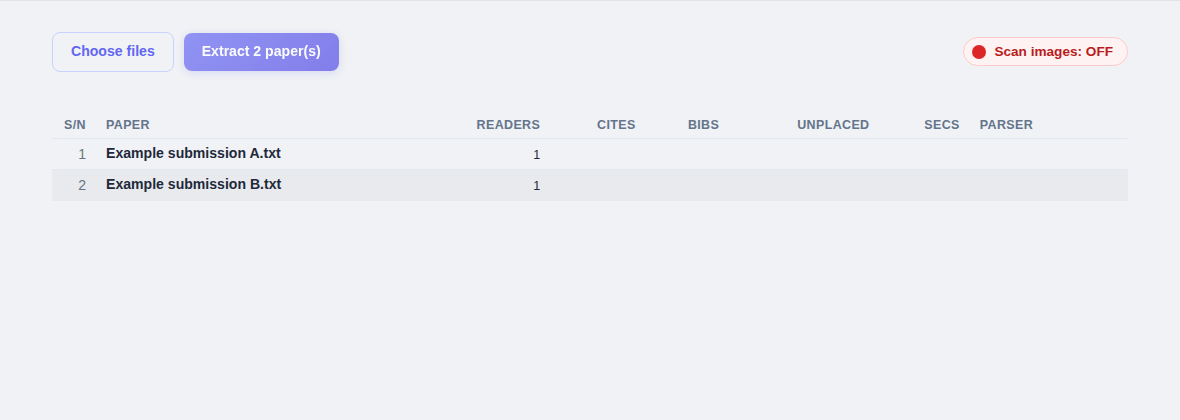 The actual interface, captured locally with two example text files selected. No papers were uploaded or processed to create this image, and the empty result columns are not measurements.
Use extraction as the intake check
One press of Extract runs extraction across the selected papers. The stage returns a row for each paper, with its available counts and any error. Read those rows before spending credits on review. Open the lists behind the counts when something looks implausible. A thesis with a substantial reference list should not be waved through because its filename appears in the table if the reading itself is empty or incomplete.
The aim of this first pass is to distinguish a document problem from a referencing problem. A missing entry means a citation has no corresponding bibliography entry after a usable reading and cross-check. An unreadable document means the checker lacks a sound basis for that comparison. Those need different follow-up messages. Asking an author to add thirty references when the bibliography was never read would turn an intake error into unnecessary work.
Before payment, papers can be added or removed and extraction repeated. Use that opportunity to correct the batch. Once review is paid for, extraction is sealed so that later stages and reports continue to refer to the same material. A deliberate preflight is easier to explain than a collection of reports whose underlying versions are uncertain.
Make the image-reading decision deliberately
Scan images is off by default. The option allows image or scanned-page reading for selected supported formats, including PDF, Word and ODT. Turn it on when the batch needs that work, then inspect the resulting reading. A mixed batch can contain text-based papers as well as documents with scanned material; the file extension alone does not tell you whether image reading is necessary.
Image processing can take longer, particularly for picture-heavy documents. The practical response is to leave time for inspection, rather than promise a universal number of minutes per thesis. If the interface warns that citations inside scanned pages will not be read with the option off, treat that as a description of the chosen processing scope. It is not evidence that those pages contain no citations.
Some source files will still need attention outside the batch. Ask for a readable export or help the author prepare an appropriate document when the reading is not usable. Do not turn an empty result into a clean-reference certificate. A consistent intake policy includes a way to say “we could not assess this version yet”.
Review one quoted batch, with its exceptions visible
The review quote brings the eligible papers into one account decision. It is based on the application’s per-paper estimates and shows the batch total, the account balance and a shortfall if there is one. Read the quote against the papers you intended to include. Empty readings can be unchargeable; a paper with citations but a missing bibliography is not automatically an empty paper. The server’s quote is the place to check the actual billable scope.
Run review on the eligible papers only after accepting the quote and the processing consent shown by the application. Review uses AI; it is different from the deterministic cross-check that follows. Chatting with the Ref[In] AI Assistant in the main application does not itself use credits, but that does not make paid native processing operations uncharged. Our assistant introduction explains that distinction.
A paper already reviewed is not charged again simply because it remains in the batch. Follow the run’s recorded state when resuming work. If processing fails or is stopped, inspect the status and the account’s recorded outcome before deciding what to rerun. Stop is a processing control, not a request for a refund or proof that a stage never started. Contact support when the result and recorded charge need investigation.
Resolve uncertain duplicates without rushing the decision
De-duplication prepares each paper’s citations and reference entries for a consistent cross-check. It can reduce repeated forms of the same work, while uncertain pairs are presented for a merge-or-keep decision. Review a pair in the context of its own paper. Two references with similar authors and years may still describe different works; two visibly different citation forms may refer to the same source.
The corpus-wide Merge all duplicates and Keep all separate controls are convenient ways to settle pending proposals when the operator has a defensible basis for the choice. They do not turn uncertain evidence into certainty. If a batch contains unfamiliar material or different disciplinary conventions, convenience alone is a poor reason to approve every merge. Look at the proposed pairs or keep them separate for the author to investigate.
Do not confuse duplicate citations inside one paper with duplication between students’ papers. Corpus does not run a similarity comparison across the cohort. A source used by several students is not, by itself, a result about copying or the originality of their work. The de-duplication stage concerns the internal bookkeeping of each document’s citation check.
Triage the cross-check into useful follow-up work
After cross-checking, look at the per-paper lists as well as the Ref[In] Score. A missing reference needs a different conversation from an uncited bibliography entry. The first may need a full entry added or a citation investigated; the second may be a source left behind during editing, a citation form that needs inspection, or material the author must decide whether to retain. The finding identifies a relationship to examine, not the explanation for it.
Record extraction exceptions separately from reference inconsistencies. Record unresolved identity or metadata issues separately from a paper whose citation/reference relationship is complete. A practical institutional response can be specific: “Please inspect these cited works without matching entries”, rather than “Your paper failed”. That keeps the author’s attention on the rows that need action.
The score provides a common scale across papers, but it is not a grade of the argument, methods or literature review. The same score can accompany different absolute amounts of correction work in documents of different sizes. Read what a Ref[In] report tells a supervisor before deciding how to use the number in an institutional process.
Mechanical referencing defects are quality problems; they do not establish why an author made them. A finding that a cited source cannot be established to exist is a different issue requiring a source investigation. Academic misconduct decisions belong to the institution’s process and evidence, not an automatic label attached to an orphan entry or a low score.
Return a report for each paper, not only a cohort summary
Produce the Level 1 reports once the organising stages are complete. Each paper has its own download and share action, and Download all collects ready reports in a zip. Reconcile the returned reports with your intake list. If a paper has no ready report, keep the reason visible rather than presenting a partial archive as the complete batch.
Keep the report associated with the version checked. A later revision may resolve the listed problems or introduce different ones; its author should not be asked to defend an old report as if it describes the new file. If the institution asks for another check, record the new version and preserve the earlier context according to its own records policy.
The buttons mint fresh download or share links when used. A saved corpus can therefore be reopened later to request the current download action; that is different from promising that a short-lived download ticket can be reused indefinitely. Treat share links as access to potentially sensitive report content and distribute them to the intended recipient.
Three institutional ways to use the same workflow
A library or writing centre: staff can use a batch to prepare reference-checking consultations. Ask students to bring the relevant report and source version to the conversation. Use the findings to explain a citation/reference relationship, demonstrate how to inspect a missing entry, and decide what the student should check next. The report supports a discussion; it does not replace teaching disciplinary citation practice.
A supervisor or programme team: a consistent first pass can make revision discussions more focused. The supervisor receives a report for each paper, while the operator keeps intake exceptions visible. Avoid prescribing a single acceptable score as a measure of research quality. The value is that each discussion can begin with the actual rows rather than a vague instruction to “tidy the references”.
A graduate school or thesis office: the run can provide a record of the mechanical reference check performed on an intake. Decide beforehand how exceptions are returned, who follows up, and whether a revised submission needs another check. Corpus supplies per-paper evidence on a shared scale; the institution supplies its submission rules, accessibility arrangements, support and academic judgment.
These are suggested operating procedures, not claims about a particular university’s deployment or measured time savings. Different institutions will choose different points in their submission process. Begin with an authorised, manageable batch so staff understand the controls and outputs before relying on the procedure across a larger intake.
Plan for retention and the next batch
Before payment, a paper’s corpus working session is kept for 24 hours from its latest activity; an unpaid run is not a saved institutional record. After the review is paid for, the corpus is saved on the account for one year from payment. Saved corpora can be reopened through the sidebar, and each run has its own retention clock. These periods are described in the Privacy Policy.
That application retention period is not the institution’s entire records policy. Decide where downloaded reports belong, who may retain copies, and what happens when a staff member leaves the role. Saved runs are erased on account deletion or through a request to the service; the workspace does not offer ordinary users an individual delete button for paid corpora. Ask support when erasure or retention requirements need clarification.
Process another corpus starts a new batch without treating the previous paid run as disposable. Before moving on, reconcile the reports, record unresolved exceptions, and send the agreed follow-up messages. That short closing routine is what turns a set of automated checks into an accountable institutional service.
One press per stage, with human decisions between stages
Corpus reduces the repetition of opening a separate organising workflow for every paper. A single press at a stage acts across the eligible batch; it is not a literal single-prompt assistant that completes every stage unattended. The Ref[In] AI Assistant is not embedded in the Corpus workspace. File preparation, the review quote, ambiguous duplicate decisions and interpretation of the reports remain visible parts of the job.
For papers needing missing-source searches or reference updates, the author can use the individual-paper workflow in the main application. Those branches involve choosing changes to a particular document and are outside Corpus’s Level 1 batch scope. The Ref[In] Methodology explains why the organising record and later correction/export records describe different milestones.
A useful bulk reference-checking procedure therefore has a clear beginning and end: authorised files and a documented purpose go in; per-paper reports and a traceable exception list come out. Between them, the software runs its checks and people make the decisions those checks cannot make for them.
Bring the organising checks into one batch, and keep the decisions with the people responsible for each paper.
Try Corpus